Applies to: Windows SSTP VPN clients, Windows Server RRAS
Legacy note: This article was originally written for Windows 8.1 and Windows 7 clients. The troubleshooting principle is still relevant to SSTP: the VPN client must be able to validate the server certificate, including certificate revocation information.
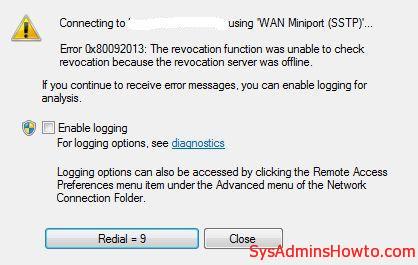
An SSTP VPN connection can fail with the following error:
Error 0x80092013: The revocation function was unable to check revocation because the revocation server was offline.
Why SSTP Error 0x80092013 Occurs
SSTP uses TLS to establish the VPN tunnel. The Windows client validates the certificate presented by the VPN server. If the certificate chain contains a CRL Distribution Point (CDP), the client must be able to retrieve the required Certificate Revocation List (CRL).
This commonly fails when the certificate contains a CRL URL that is reachable only from the internal network, the CRL has expired, DNS or firewall rules block the URL, or the issuing CA no longer publishes the CRL at the location embedded in the certificate.
Recommended Fix: Make the CRL Reachable
The preferred solution is to correct certificate revocation access instead of disabling revocation checking.
- Inspect the VPN server certificate and check its CRL Distribution Points.
- From an external VPN client, confirm that the HTTP or HTTPS CRL URL is reachable before the VPN connection is established.
- Verify that the CRL is current and has not expired.
- If an internal PKI is used, publish the CRL to an externally reachable distribution point and make sure certificates are issued with the correct CDP URL.
- If the existing certificate contains an unusable CDP, correct the CA configuration and reissue the VPN server certificate as required.
You can export the VPN server certificate and use Windows certutil to test its certificate and revocation URLs:
certutil -URL vpn-server.cer
certutil -urlfetch -verify vpn-server.cer
For deeper troubleshooting, the Microsoft-Windows-CAPI2 Operational log can also help identify certificate chain and revocation retrieval failures.
Temporary Workaround: Disable SSTP CRL Checking
If you need to prove that CRL retrieval is the cause, the SSTP client has a registry setting that can bypass the revocation check. This should be treated as a temporary troubleshooting workaround, not the preferred production fix, because the client can no longer use revocation status to reject a revoked VPN server certificate.
Registry path:
HKEY_LOCAL_MACHINE\SYSTEM\CurrentControlSet\Services\SstpSvc\Parameters
Create the following DWORD (32-bit) value:
Value name: NoCertRevocationCheck
Value data: 1

After testing, remove the value or set it back to 0 and correct the CRL publication or reachability problem.
Microsoft References

Cloud and infrastructure professional with nearly two decades of experience in enterprise IT environments, spanning public cloud, private cloud, and hybrid architectures.